SEE MEE: See yourself in the clothing from the brands you love as you shop online
Save one reference photo. Shop normally. Click SEE MEE. The product image becomes a generated try-on of you, right where you found it.
Thesis
Try-on belongs inside the shopping flow, not in a separate upload-and-wait box.
Artifact
A Manifest V3 Chrome extension with a content script, background worker, popup setup, injected SEE MEE buttons, image edits, inline DOM replacement, and a local IndexedDB Closet.
Demo video
Screen recordingDemo recording
The real flow: browse a product page, use the injected SEE MEE control, generate a try-on, and keep the result in the shopping context.
Extension screenshots
Supporting detail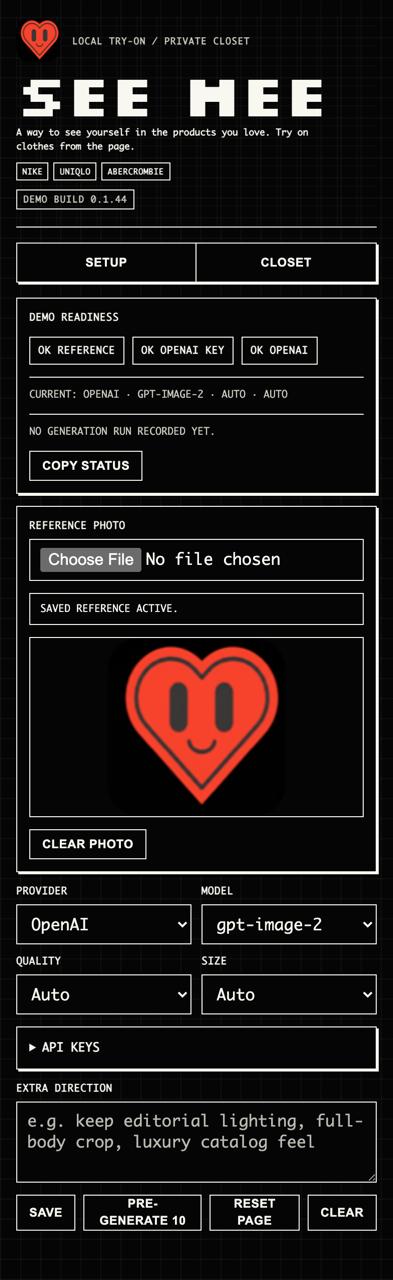
Setup
The extension popup stores the reference photo, model settings, API key, and demo controls.
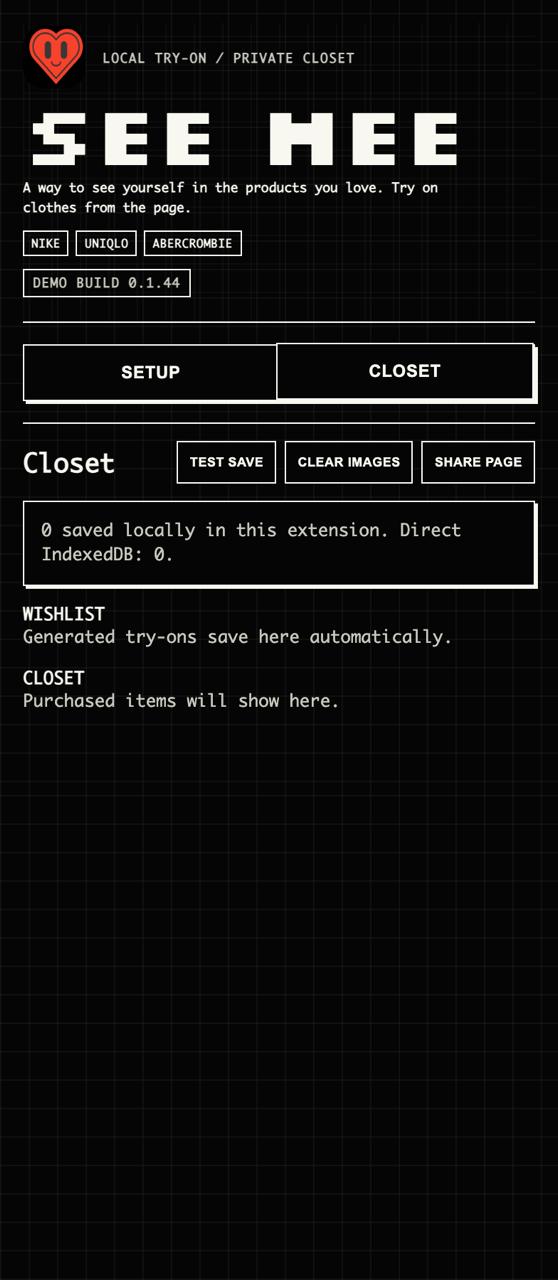
Closet
Generated try-ons save locally inside the extension so the page can restore results later.
What it is
SEE MEE lets you try on clothes from the brands you love while you shop online.
No separate app. No new tab ritual. Just the product page, your reference photo, and one button.
What it does
A content script scans retail pages for product images, filters tiny assets and repeated UI images, then injects a black SEE MEE button onto eligible product cards.
On click, it captures the product image, product URL, title hints, and page context, then hands the job to a background worker so the page can keep behaving like a normal shopping page.
Demo flow
Install extension. Save reference photo. Open Nike, Uniqlo, or Abercrombie. Click SEE MEE. Keep browsing in the same grid.
For demos, Pre-generate 10 queues visible products one by one so latency does not kill the room with a tiny spoon.
Model path
The working path uses OpenAI gpt-image-2 through an image edit flow. The product image is treated as the source of truth for garment shape, colorway, logos, seams, pose, crop, lighting, and styling.
The saved reference photo supplies identity constraints. The prompt asks the model to preserve the clothing and scene while changing only the visible person identity: face, skin tone, hair, proportions, and light matching.
Local state
The popup stores reference status, provider settings, model settings, and generation history locally in the extension. The Closet is not a cloud account pretending to be privacy.
Generated try-ons are indexed locally so the extension can restore results, clear them, or share the current page state without making the user manage files manually.
Where it goes
The current version uses one reference photo and a general image model, so it works but can drift across face, hair, and body identity.
The stronger version uses a reusable identity profile or lightweight per-user adaptation so likeness stays stable across products. The bigger experiment is browser-native personalization: a private identity layer over commercial pages.
Build note
Make your own prototype.
A responsible maker prompt for building a local visual try-on prototype. Bring your own API key, use only consenting reference photos, and do not ship the toy as production.
Safety boundary
- Use only your own reference photo or a photo from someone who explicitly consented.
- This is for personal prototyping and learning, not impersonation, surveillance, scraping, or commercial deployment.
- Do not hardcode, log, screenshot, or publish API keys.
- Do not scrape shopping sites in bulk or bypass site restrictions.
- Verify the current OpenAI image edits API docs before making live requests.
Show the full prompt
Build me a Chrome extension called SEE MEE.

SEE MEE is a visual try-on browser extension. The user uploads one reference photo of themselves, goes to a shopping website, clicks a SEE MEE button on a product image, and the extension generates a new image where the original outfit/product stays faithful but the person looks like the user.

This is a demo/prototype, not a production system. Prioritize reliability, simple UX, clear debugging, and avoiding unnecessary API spend.

## Safety and Use Boundaries

- Use only your own reference photo or a photo from someone who explicitly consented.
- This is for personal prototyping and learning, not impersonation, surveillance, scraping, or commercial deployment.
- Do not generate try-ons of people who did not opt in.
- Do not hardcode, log, screenshot, or publish API keys.
- Do not scrape shopping sites in bulk or bypass site restrictions.
- For the demo, broad host permissions are acceptable, but explain the risk in README.md and offer a narrower match-pattern option for users who only want to test on specific stores.
- Verify the current OpenAI image edits API docs before making live requests.

## Core User Flow

1. User installs the Chrome extension.
2. User opens the extension popup.
3. User adds:
   - one reference photo of themselves
   - an OpenAI API key
   - optional extra prompt direction
4. User visits a shopping website.
5. The extension detects large product/model images on the page.
6. When the user hovers over a product image, show a SEE MEE button.
7. When clicked:
   - capture the product image URL
   - capture the product image as page/canvas data if possible
   - capture page context: product URL, page URL, product name, image alt text
   - send exactly one generation request
8. Generate an edited image using:
   - product image as input image 1
   - reference photo as input image 2
9. Insert the generated result inline over the original product image.
10. Save the generated image locally into a Closet library using IndexedDB.

## Important Product Requirements

- This must work as a Chrome Manifest V3 extension.
- It should work across ordinary shopping websites, not only one domain.
- It should support Nike, Uniqlo, and Abercrombie-style product grids, but do not hardcode only those sites.
- Use one reference photo only.
- Generate one image at a time.
- Add a “Pre-generate 10” button, but it must queue images sequentially, not fire 10 API requests in parallel.
- Generated images should remain visible while scrolling.
- If the retailer swaps images on hover, the generated SEE MEE result should stay visible and not flicker back to the original model.
- Results should save automatically to a local Closet.
- Closet should have:
  - Wishlist section
  - Closet section
  - Open product link
  - Move between Wishlist and Closet
  - Delete
  - Clear Images
- Storage should be local/private using IndexedDB. Do not require a backend for the demo.
- The extension should not have extra popups after generation. Serve the image inline on the shopping page.

## Image Model

Default provider should be OpenAI.

Use the current OpenAI image edit API correctly.

Main model:
gpt-image-2

Use the official OpenAI image edits endpoint.

Important:
- Do not use input_fidelity unless official docs confirm the model supports it.
- Do not use masks unless there is a clear tested reason. For this demo, avoid masks.
- Do not use complex safety/rejection logic that blocks usable generations.
- Do not batch live API tests during development.
- Do not spend tokens until request shape, UI flow, and local tests pass.

The request should send:
- model: "gpt-image-2"
- image[]: first the product image
- image[]: second the user reference photo
- prompt: strong product-preservation prompt
- size: default "auto" if supported
- quality: default "auto" if supported
- request timeout around 3 minutes

Return should be handled as base64 image data and converted to a data URL for inline display.

## Generation Prompt

Use a prompt like this:

Create exactly one realistic catalog try-on image.

Input image 1 is the product photo and must remain the source of truth for the outfit, pose, body position, camera angle, crop, background, lighting, shadows, and product photography style.

Input image 2 is only the identity reference for the person. Use it for facial likeness, face shape, eyes, nose, mouth, brow, natural skin tone, and visible hair character.

Preserve every product detail from image 1:
- garment shape
- fit
- silhouette
- fabric texture
- seams
- wrinkles
- neckline
- sleeves
- straps
- hems
- waistband
- logos
- graphics
- print placement
- colors
- accessories
- shoes
- socks
- bags
- jewelry
- styling

Do not restyle, redesign, repaint, simplify, crop out, replace, or reinterpret any garment or product visible in image 1.

Change only the visible human identity:
- face
- head
- hair
- neck
- exposed skin tone

Do not copy the reference person’s clothing, background, pose, camera crop, or expression if it conflicts with image 1.

The final person must be coherent, proportional, and naturally relit into image 1. Match the original model’s head size, head angle, body pose, neck length, shoulders, perspective, lens sharpness, and studio lighting.

Return one clean product-photo result.

## Lessons From Prior Debugging

Avoid these mistakes:

1. Do not overbuild the first version.
   Keep the path simple:
   reference photo → product image → image edit → inline result → local save.

2. Do not use masks by default.
   Masking caused product preservation and runtime issues.

3. Do not add aggressive validation that rejects generated outputs.
   It made the extension appear broken even when the model returned usable images.

4. Do not fire multiple image jobs at once.
   Pre-generate 10 must run sequentially:
   image 1 finishes → image 2 starts → etc.

5. Do not rely only on img.naturalWidth.
   Some retail sites show visible product images while naturalWidth is still 0.
   Use visible bounding-box size as a fallback.

6. Product image detection must scan:
   - img
   - picture source[srcset]
   - product cards
   - article/li/card/tile/product containers
   - background images where applicable

7. Product matching for saved images should avoid matching only the category/listing URL.
   Match by:
   - product URL when available
   - product image URL
   - alternate image URLs from the same card

8. If the page says “No eligible product images found,” include debug text:
   - number of images scanned
   - number of possible product cards scanned

9. Generated image overlays must suppress retailer hover-swaps.
   If the user hovers over a product after generation, it should not revert to the retailer model image.

10. Do not expose API keys in logs, screenshots, or copied status.

11. If Gemini is added later:
   - use the correct Gemini image generation API shape
   - do not send unsupported fields like responseModalities if the endpoint rejects them
   - keep Gemini optional, not the default

## Extension Files

Create this structure:

see-mee-extension/
  manifest.json
  src/
    background.js
    content.js
    content.css
    popup.html
    popup.js
    popup.css
    closet-db.js
  icons/
    icon16.png
    icon32.png
    icon48.png
    icon128.png
  scripts/
    package-extension.mjs
    test-content-dom-smoke.mjs
    test-openai-request-shape.mjs
    test-error-debugging.mjs
  README.md

## Manifest Requirements

Use Manifest V3.

Permissions:
- storage
- unlimitedStorage
- activeTab
- scripting
- tabs
- contextMenus

Host permissions:
- http://*/*
- https://*/*

Content scripts:
- match ordinary http/https pages
- inject src/content.js
- inject src/content.css
- run at document_idle

Background:
- service worker: src/background.js
- type: module

## Popup UI

The popup should include:

- title: SEE MEE
- short description
- setup readiness badges:
  - reference photo saved
  - API key saved
  - provider/model selected
- file input for one reference photo
- provider select:
  - OpenAI
- model select:
  - gpt-image-2
- quality select:
  - Auto
  - Low
  - Medium
  - High
- size select:
  - Auto
  - Portrait
  - Square
  - Landscape
- extra direction textarea
- Save button
- Pre-generate 10 button
- Reset Page button
- Clear button
- Copy Status button
- Closet tab

Do not make the UI overly complicated.

## Content Script Behavior

content.js should:

1. Listen for mouseover events.
2. Find the nearest eligible product image.
3. Show a SEE MEE button near the image.
4. On click:
   - cancel any old active generation
   - show inline loading state
   - send POSE_IMAGE_FROM_PAGE to background
5. On POSE_RESULT:
   - replace loading state with generated image
6. On POSE_ERROR:
   - show clear inline error
7. On POSE_PREGENERATE_PAGE:
   - collect up to 10 visible product targets
   - run them sequentially
8. On POSE_CLEAR_PAGE:
   - remove generated/error/loading overlays
9. On Closet change:
   - restore saved generated images inline where products match

Eligibility rules:
- visible image/card at least around 180x180 px
- allow natural dimensions to be unknown/zero if visible box is large enough
- skip icons, logos, swatches, thumbnails where possible
- prefer product cards with product links
- dedupe by product URL or image URL

## Background Worker Behavior

background.js should:

1. Handle POSE_IMAGE_FROM_PAGE.
2. Read saved settings from Chrome storage.
3. Validate:
   - API key exists
   - reference photo exists
   - product image exists
4. Fetch or receive product image.
5. Convert inputs to image blobs.
6. Call OpenAI image edit endpoint.
7. Return generated image as data URL.
8. Save successful result to Closet.
9. Send POSE_RESULT to the active tab.
10. On failure, send POSE_ERROR.

Also record last generation status in storage:
- provider
- model
- product URL
- product image URL
- page URL
- product name
- whether reference exists
- request started timestamp
- request completed/failed timestamp
- duration
- exact API error message
- error category
- whether generated image inserted into page
- whether saved to Closet
- product image byte size
- reference image byte size
- prompt length

Error categories:
- billing/quota
- rate limit
- timeout
- API key
- product image fetch
- missing reference
- content policy
- unknown

## Closet

Use IndexedDB inside the extension.

Each saved item should include:
- id
- createdAt
- imageUrl
- productImageUrl
- productUrl
- productName
- store/hostname
- model
- quality
- section: wishlist or closet

Add backup behavior only if needed, but primary storage should be IndexedDB.

## Debugging UX

Add “Copy Status” in popup.

It should copy a plain text summary:
- build version
- provider
- model
- quality
- size
- reference present: yes/no
- API key present: yes/no
- last status
- error category
- exact error
- product URL
- product image URL
- page URL
- duration
- product/reference byte sizes
- inserted into page: yes/no
- saved to Closet: yes/no

This helps users send useful debugging info.

## Tests

Before any live API call, implement and pass tests:

1. JavaScript syntax checks.
2. Content-script DOM smoke test:
   - detects product image
   - shows SEE MEE button
   - sends one request on click
   - switches active target correctly
   - pre-generate starts only one image at a time
   - saved results restore inline
   - hover does not reveal original retailer image
   - Uniqlo-style image with naturalWidth = 0 still works
3. OpenAI request-shape test:
   - uses /v1/images/edits
   - sends product image first
   - sends reference image second
   - does not send mask
   - does not send unsupported params
4. Error categorization test.
5. Package test.

Only after all no-token tests pass, run one live image generation test.

If the live test fails because of billing hard limit or quota, stop. Do not retry repeatedly.

## Definition Of Done

The extension is done when:

- It loads cleanly in Chrome.
- Popup shows setup readiness.
- User can save one reference photo and API key.
- SEE MEE button appears on product images.
- One click triggers exactly one generation request.
- Generated image appears inline over the original product image.
- Generated image stays visible while scrolling and hovering.
- Successful output saves locally to Closet.
- Closet displays saved images.
- Pre-generate 10 queues sequentially.
- Failures show useful human-readable messages.
- Copy Status gives useful debug info.
- No extra generation popups.
- No batch API spam.
- No broken masks.
- No confusing model options.

Important implementation note:

Keep the first build narrow. The hard part is not the popup.
The hard part is reliable product-image detection, sequential generation, preserving the garment, and serving the result inline without fighting retailer hover/lazy-load behavior.